

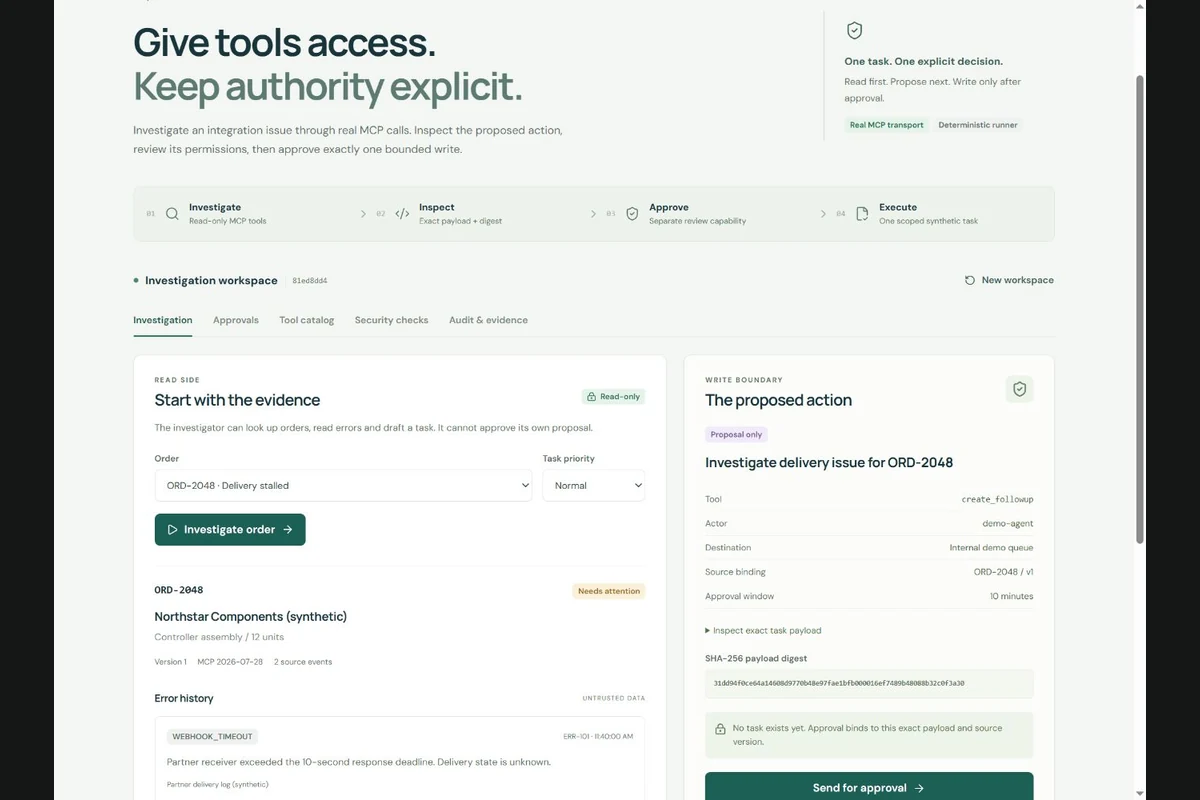
A reviewer approving a task needs to see its destination, contents and intended effect. If those details can change after approval, the execution may be authorised by a decision about something else. Binding the review to the exact action is a useful place to start when designing an AI workflow that can write to business systems.
Show the proposed change before asking for approval
Suppose an assistant investigates a failed order integration and proposes a follow-up task. A useful review screen shows the order, destination queue, task title, description and supporting evidence. The reviewer should be able to understand the proposed write without reconstructing it from a chat.
The MCP tools specification requires servers to validate inputs and implement access controls. It also recommends that clients show tool inputs and request confirmation for sensitive operations. A confirmation screen and the server's permission checks therefore have separate jobs.
For this task workflow, the server can record a digest of a consistently serialised payload, together with the workspace, resource and source version. Execution then presents the approval identifier and the expected digest. The server compares them with its stored record before it writes anything. A digest helps detect changed content; it does not establish who had authority to approve it.
Give approvals a useful lifetime
The order may change while the task is waiting for review. Someone might repair the integration, cancel the order or create the follow-up manually. An approval that was reasonable earlier can become stale without anyone editing its payload.
Decide which changes invalidate the action. For an order investigation, binding approval to the investigated source version makes that dependency explicit. An expiry limits how long an unused approval remains available. At execution, the service should check those conditions alongside the caller's current permissions and the recorded decision.
A stale action needs a fresh proposal based on the current evidence. Silently substituting the latest order data would change what the reviewer assessed. The interface should explain the specific reason execution stopped so the user can investigate or request another review.
Keep retries from creating another task
A successful write can be followed by a lost response. The caller then cannot tell whether retrying will create another task. For a task stored in the same database as the approval, the execution record and task creation can be committed together. A replay can return the existing task.
An external task service adds another failure boundary. A local database transaction cannot also commit a remote API's state. That integration needs its own duplicate handling and a way to reconcile uncertain outcomes. The webhook retry example explores the related case where a receiver commits a change but its acknowledgement is lost.
Test the decisions the server should refuse
A useful test set includes execution before approval, a changed payload, a different workspace, an expired decision and a changed source record. Check the stored task count and history as well as the response. A denial message is only convincing if the attempted write left no task behind.
Workflow Lab
demonstrates this pattern using a real MCP client and server. A deterministic
investigator prepares a synthetic task, a separate review capability records
the decision, and create_followup checks the payload digest,
workspace, actor, resource, source version and expiry. Replaying a completed
action returns the existing task. Its
contract describes the exposed operations.
The lab performs no model inference and sends no external messages. One visitor can switch between its demo capabilities, so it does not establish independent approval by two people. In a deployed service, reviewer identity and permission would need to come from the organisation's actual access controls. The review record should let an operator inspect what was approved, what executed and why a later attempt was refused.
Continue the conversation.
Comments are hosted on GitHub. Load the discussion to read or leave a comment.